Reading value from a later footer memo with double pass causes incorrect result after 2 columns

am generating a cash flow report in FastReport VCL (Delphi) where each column represents a day, and each day must carry the final balance to the next day. The simplified band structure is:
MasterData
  Detail (Credits)
     Footer (Total Credits / Total + Last Day Total)
Mase
  Detail (Debits)
     Footer (Total Debits / Final Balance)
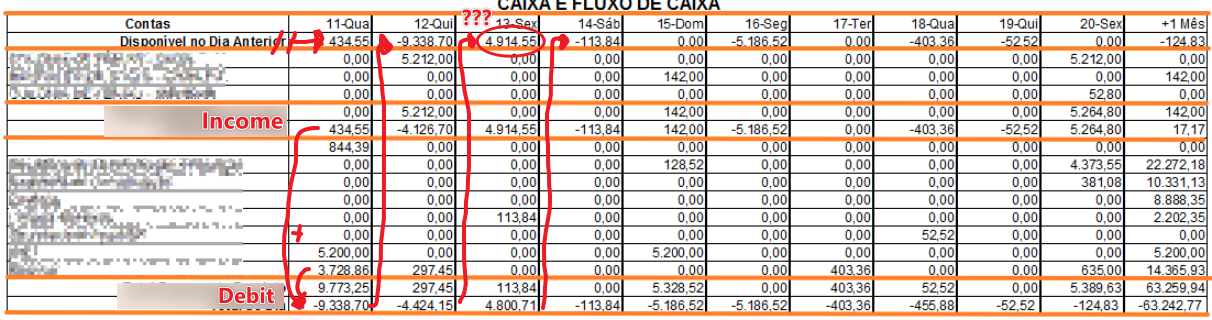
The final balance of the column is then used as the starting balance of the next column using like: (Except the first one, which gets its value from a Query on code)
[Memo22.Value] and the other day totals [Memo98.Value + Memo49.Value]
DoublePass is enabled, otherwise the first columns cannot access values calculated later in the report. Credits and Debits also come from different DataSets.
THE PROBLEM IS
The first two columns calculate correctly, but starting from the third column the starting balance becomes incorrect. The total value from day 12 is -4.424,15 but passing to the next day, the value become 4.914,55 positive, and i can't even find where that number come from...
I've also tried using BEFORE PRINT on the top Memos, but the result is the same. Any guidance on the correct way to carry calculated balances between columns? What could be the issue?
Thanks in advance!