Multi-Page report collating still not working... Prints all page 1 then all page 2

I'm trying to print a 2 pages report. that should print a report for every record on a dataSet, so, for each record, it should print, i.e. for 2 records: page 1 > page 2 page 1 > page 2
But instead, it is printing page 1 > page 1 > page 2 > page 2
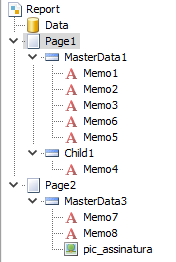
This is the structure of my report. MasterData 1 and 3 uses the same dataset... does anyone know what could it be or what i could do to make it print the way i mentioned?
I've done some research, and this looks like to be in relation to the 'Collate' property that doesn't do anything, and that it is a problem old that existis since 2014 or less... but i couldn't find anything to correct this other than "use only ONE page". But i need both pages
Comments
You can resort preview pages after report's preparing:
or assign TfrxReport.Dataset with your dataset
It worked! Thank you!