FR on FPC error

FR 2026.1.7 on Lazarus 4.2+FPC3.2.2:
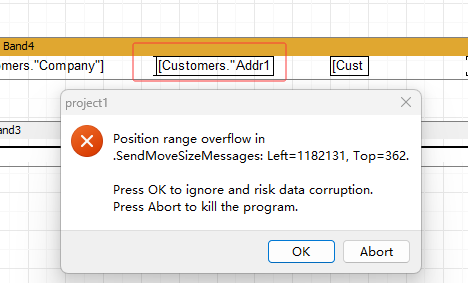
When the Lazarus app is running, if you hover your mouse over that field inside the red box for just a few seconds, it throws an error.
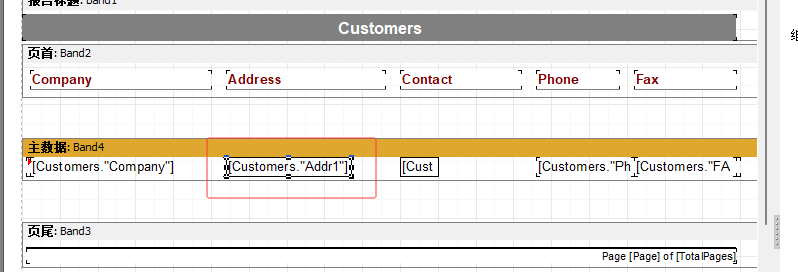
I found that the problem happens whenever the width of that cell in the red box is smaller than the length of the text inside it.
Comments
I have identified the cause of the problem: it was caused by the hint.
modify FastReport\FPC\Sources\frxDesgnWorkspace.pas.
procedure TfrxDesignerWorkspace.RealHintShow(var Msg: TCMHintShow);
var
Header, PropText: String;
HMemoView: TfrxCustomMemoView;
begin
if not (FLastObjectOver is TfrxCustomMemoView) then Exit;
HMemoView := TfrxCustomMemoView(FLastObjectOver);
if HMemoView.HasOutboundContent then
begin
Header := frxResources.Get('obText');
PropText := HMemoView.Text;
Msg.HintInfo.HintStr :={$ifdef fpc} Header + LineEnding + {$endif}PropText;
{$ifndef fpc}Msg.HintInfo.HintWindowClass := TDesgnHintWindow;
Msg.HintInfo.HintData := TDesgnHintData.Create('', Header, False, HMemoView);{$endif}
Msg.HintInfo.HideTimeout := MaxInt;
end;
end;
Testing has confirmed that it runs correctly on both Windows and Linux.
I hope that, once verified, this code can be merged into the new version. Thank you in advance!